
Automation tools are becoming essential for businesses that want to save time and reduce repetitive work.
One of the newest tools gaining attention is Relay.app.
But how does it compare to established automation platforms like Zapier and Make.com?
In this Relay.app review, we’ll cover its features, pricing, pros and cons, and whether it’s worth trying.
If you’re comparing automation platforms, you may also want to read our Relay.app vs Zapier

What Is Relay.app?
Relay.app is an AI-powered workflow automation tool designed to help users automate tasks between apps.
Think of it as a simpler and more collaborative alternative to traditional automation tools.
You can automate things like:
- Lead notifications
- CRM updates
- Email workflows
- AI content pipelines
- Slack alerts
- Form processing
- Task management
Its biggest selling point is combining automation + human approval steps, which many tools don’t handle well.
Key Relay.app Features
1. Visual Workflow Builder
Relay offers an easy drag-and-drop interface.
You can build automations without coding.
That makes it beginner-friendly compared to more technical tools.
2. Human-in-the-Loop Automation
This is Relay’s standout feature.
You can pause workflows and request human approval before the next step runs.
Examples:
- Approve AI-generated emails
- Review lead assignments
- Confirm task updates
This gives more control than fully automated workflows.
3. AI-Powered Actions
Relay supports AI steps inside workflows, allowing you to:
- Summarize text
- Generate replies
- Extract information
- Draft content automatically
This makes it more modern than traditional automation tools.
4. App Integrations
Relay connects with popular tools like:
- Slack
- Gmail
- Google Sheets
- Notion
- HubSpot
- Airtable
The integration library is growing quickly.
Relay.app Pricing
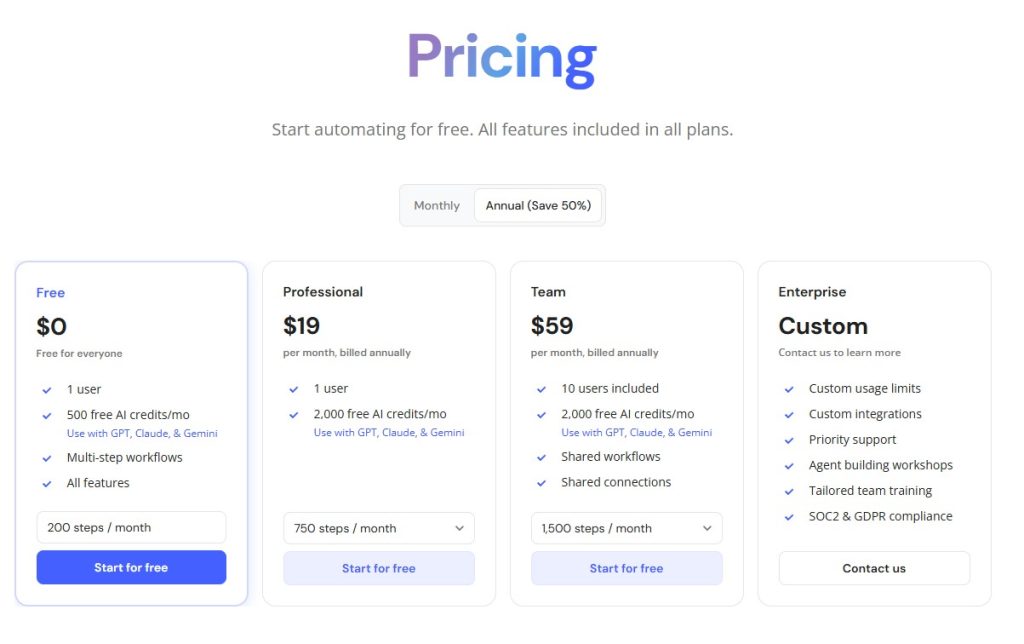
Relay offers pricing suitable for individuals and teams. For a full breakdown of plans and value, check our detailed Relay.app Pricing guide
Compared to larger competitors, pricing feels approachable.
Relay.app Pros and Cons
Pros
✅ Easy to use
✅ Beautiful interface
✅ Human approval steps
✅ AI-powered automation
✅ Great for teams
Cons
❌ Fewer integrations than Zapier
❌ Newer platform
❌ Advanced workflows may still favor Make.com
Relay.app vs Zapier
Compared to Zapier:
Relay.app
- Easier UI
- Better collaboration
- Human approval features
- AI-native feel
Zapier
- More integrations
- More mature platform
- Larger ecosystem
If you want simplicity, Relay may win.
You can read our full Relay.app vs Zapier comparison for a detailed side-by-side breakdown.
Relay.app vs Make.com
Compared to Make:
Relay.app
- Easier learning curve
- Better for teams
Make.com
- More powerful workflows
- Better for advanced users
We also compared Relay.app vs Make to help you choose the right automation platform.
Who Should Use Relay.app?
Relay.app is ideal for:
- Small businesses
- Agencies
- Marketing teams
- Operations teams
- Real estate lead automation
- AI workflow builders
If you want modern automation without complexity, Relay is worth trying.
Final Verdict: Is Relay.app Worth It?
Relay.app is one of the most promising new automation tools available.
Its combination of:
- Easy automation
- AI actions
- Human approval steps
makes it especially attractive for teams.
If Zapier feels too basic and Make.com feels too complicated, Relay.app may be the perfect middle ground.
Still exploring your options? Check our full list of the Best AI Automation Tools








[…] you’re new to the platform, start with our full Relay.app Review for an overview of features and use […]
[…] If you’re new to Relay, read our full Relay.app Review […]
[…] you’re exploring newer tools, start with our full Relay.app Review […]
[…] If you’re new to Relay, read our full Relay.app Review […]
[…] you’re new to the tool, read our full Relay App Review […]
[…] Read our full Relay App Review. […]
[…] Read our full Relay App Review. […]
[…] you’re new to the platform, read our full Relay App Review […]
[…] Read our full Relay App Review. […]
[…] Read our full Relay App Review. […]
[…] Read our complete Relay.app Review. […]
[…] Read our complete Relay.app Review. […]
[…] Read our Relay.app Review. […]
[…] Read our Relay.app Review. […]
[…] Read our Relay.app Review. […]
[…] Read our full Relay App Review. […]
[…] If you’d like a deeper look at the platform, read our full Relay App Review. […]
[…] Read our Relay.app Review. […]