Running a small business often means wearing multiple hats. From managing leads and sending invoices to marketing, customer support, and team collaboration, repetitive tasks can quickly consume valuable time.
The best automation software helps small businesses streamline daily operations, reduce manual work, and improve productivity without hiring additional staff.
In this guide, we’ve compared the best automation software for small businesses in 2026 based on pricing, ease of use, AI capabilities, integrations, and overall value.
Many small business owners spend hours every week completing repetitive tasks.
Common examples include:
Sending follow-up emails
Updating CRM records
Managing invoices
Tracking leads
Scheduling appointments
Creating reports
Notifying team members
Individually, these tasks may only take a few minutes. However, over weeks and months they can consume dozens of hours.
Automation software helps eliminate these bottlenecks by creating workflows that run automatically.
Instead of manually moving information between applications, automation tools can perform these actions instantly and consistently.
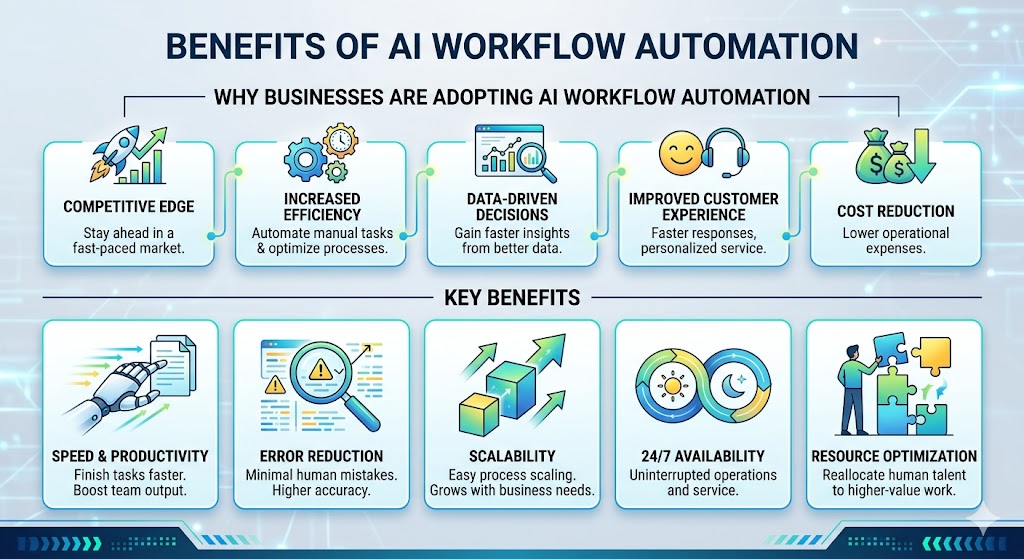
Benefits include:
Increased Productivity
Automation reduces manual work and allows teams to focus on strategic activities.
Fewer Errors
Humans make mistakes. Automated workflows help ensure tasks are completed accurately.
Faster Response Times
Customers receive faster responses and improved service.
Lower Costs
Businesses can scale operations without significantly increasing staffing requirements.
Better Team Collaboration
Automation improves communication and workflow visibility across departments.
For many businesses, automation software pays for itself within months through time savings alone.
How We Selected the Best Automation Software
To create this list, we evaluated platforms based on several important factors.
Ease of Use
Small businesses often lack dedicated technical teams, so usability is critical.
Integrations
The ability to connect with popular tools such as Gmail, Slack, Shopify, HubSpot, and Notion is essential.
Automation Capabilities
We looked at workflow flexibility, conditional logic, AI functionality, and scalability.
Pricing
Affordable pricing is particularly important for small businesses.
Reliability
Automation platforms must be stable and dependable.
Based on these criteria, the following tools stand out in 2026.
How We Tested These Automation Tools
We evaluated each platform based on:
Ease of setup
AI-powered features
Workflow automation capabilities
Integrations
Pricing
Scalability
Customer support
Overall value for small businesses
1. Relay.app
Relay.app has rapidly become one of the most promising automation platforms for small businesses.
Unlike many traditional automation tools that focus primarily on integrations, Relay emphasizes workflow clarity, collaboration, and AI-powered automation.
The platform is designed to make automation accessible without requiring technical expertise.
Key Features
Visual workflow builder
AI-powered workflow actions
Human approval steps
Team collaboration features
Multi-step workflows
Gmail integration
Slack integration
Notion integration
One feature that separates Relay from many competitors is its support for human-in-the-loop workflows.
Instead of automating everything blindly, businesses can create approval steps that allow managers or team members to review actions before they occur.
This is particularly useful for:
Customer communications
Financial approvals
Marketing campaigns
Content publishing
Pros
Beginner-friendly interface
Excellent workflow visualization
Strong AI capabilities
Collaborative workflow management
Fast setup process
Cons
Smaller integration ecosystem than Zapier
Some advanced developer features are limited
Best For
Small businesses
Agencies
Startups
Service-based businesses
Teams adopting AI workflows
If you’d like a deeper look at the platform, read our full Relay App Review.
Make, formerly known as Integromat, is one of the most powerful workflow automation platforms available today.
While Zapier focuses on simplicity, Make focuses on flexibility.
The platform offers a visual workflow builder that allows users to create highly customized automation scenarios with advanced logic and branching conditions.
For businesses with more complex requirements, Make often provides greater control than simpler automation tools.
Key Features
Visual scenario builder
Advanced workflow logic
Data transformation tools
Scheduling options
API integrations
Webhook support
Many power users prefer Make because it allows them to design workflows that would be difficult or expensive to build elsewhere.
Pabbly Connect has gained popularity among small businesses thanks to its affordable pricing model and generous automation limits.
Many users initially discover Pabbly because of its lifetime deals, which can provide significant long-term savings compared to subscription-based competitors.
Key Features
Multi-step workflows
App integrations
Webhooks
Data transfer automation
Scheduling tools
Pros
Budget-friendly
Good value for money
Simple setup process
Cons
Smaller ecosystem than Zapier
Interface feels less modern
Best For
Budget-conscious small businesses and solopreneurs.
Integrately is designed for businesses that want automation without complexity.
While platforms like Make provide extensive customization, Integrately focuses on getting workflows running as quickly as possible.
Its library includes thousands of ready-made automations that users can activate with minimal setup.
For small businesses that don’t have time to build workflows from scratch, this simplicity can be a major advantage.
Key Features
One-click automation templates
Multi-app integrations
Prebuilt workflows
Easy setup process
Beginner-friendly interface
Pros
Very easy to learn
Fast deployment
Minimal technical knowledge required
Cons
Less flexible than Make
Fewer advanced workflow options
Best For
Beginners
Small teams
Business owners new to automation
6. Microsoft Power Automate
Microsoft Power Automate is part of the Microsoft ecosystem and integrates deeply with Microsoft 365 products.
For businesses already using Outlook, Teams, SharePoint, and Excel, Power Automate can be a natural choice.
The platform supports cloud workflows, desktop automation, AI-powered actions, and enterprise-grade security.
Key Features
Microsoft 365 integration
Cloud automation
Desktop automation
AI Builder
Enterprise security controls
Pros
Excellent Microsoft integration
Strong security
Enterprise-level capabilities
Cons
Can be difficult for beginners
Less intuitive than Relay or Zapier
Best For
Microsoft 365 users
Professional services firms
Businesses already invested in Microsoft products
7. n8n
n8n has become one of the most popular open-source workflow automation platforms.
Unlike many commercial tools, n8n allows businesses to self-host their automation infrastructure and maintain full control over their data.
This flexibility has made it especially popular among developers and technical teams.
Key Features
Open-source platform
Self-hosting support
API integrations
Advanced workflow logic
Custom scripting
Pros
Highly flexible
Cost-effective at scale
Strong developer community
Cons
Requires technical knowledge
Less beginner-friendly
Best For
Developers
Technical teams
Businesses requiring data ownership
8. ClickUp
ClickUp is more than a project management platform—it also includes powerful workflow automation features for small businesses. Users can automate recurring tasks, status changes, notifications, approvals, and team assignments without coding.
Best For
Project management
Team collaboration
Task automation
Key Features
No-code workflow automation
Custom automations
Task dependencies
AI assistant
Time tracking
Pros
Excellent all-in-one workspace
Easy automation builder
Affordable pricing
Cons
Advanced features require paid plans
Rating
⭐⭐⭐⭐☆
9. Airtable
Airtable combines spreadsheets with databases, making it an excellent choice for businesses that need flexible data management and workflow automation.
Best For
Content management
CRM
Marketing teams
Key Features
Database automation
AI-powered fields
Forms
Automations
Integrations
Pros
Extremely flexible
Beginner-friendly
Great templates
Cons
Can become expensive as your team grows
Rating
⭐⭐⭐⭐☆
10. Monday.com
Monday.com helps small businesses automate repetitive project management tasks while improving collaboration between teams.
Best For
Team collaboration
Operations
Marketing
Key Features
Workflow automations
Dashboards
AI assistant
CRM
Project management
Pros
Beautiful interface
Easy to learn
Strong automation features
Cons
Pricing increases with larger teams
Rating
⭐⭐⭐⭐☆
11. Zoho Flow
Zoho Flow allows businesses to connect apps and automate workflows without writing code.
It integrates particularly well with the Zoho ecosystem while also supporting hundreds of third-party applications.
Best For
Zoho users
CRM automation
Business workflows
Key Features
Drag-and-drop builder
Conditional workflows
Webhooks
Multi-step automations
Pros
Excellent Zoho integration
Affordable
Easy setup
Cons
Smaller integration library than Zapier
Rating
⭐⭐⭐⭐☆
12. Kissflow
Kissflow is designed for businesses looking to automate approvals, HR processes, procurement, and internal workflows.
Best For
HR
Finance
Enterprise workflows
Key Features
Process automation
Forms
Approval workflows
No-code builder
Analytics
Pros
Business-friendly interface
Strong approval workflows
Scalable
Cons
Better suited to medium and large businesses
Rating
⭐⭐⭐⭐☆
Common Automation Use Cases for Small Businesses
Many business owners understand that automation can save time, but they’re not always sure where to start.
Here are some of the most common ways small businesses use automation software.
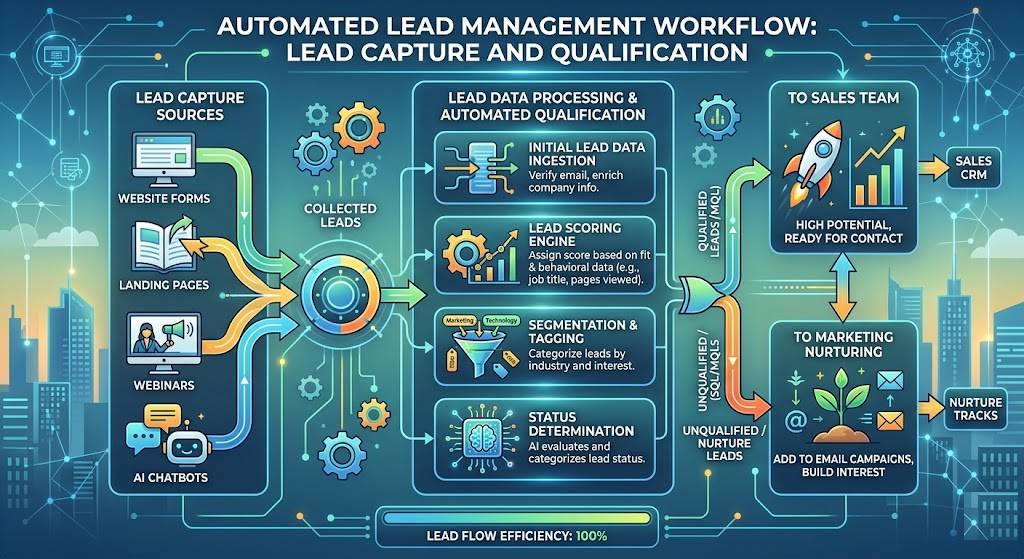
Lead Management
Automation can instantly:
Capture leads from forms
Update CRM records
Notify sales teams
Send welcome emails
This ensures every lead receives attention quickly.
Customer Support
Businesses can automate:
Ticket routing
Customer notifications
Follow-up emails
FAQ responses
This improves response times while reducing support workloads.
Marketing Automation
Automation platforms can:
Schedule campaigns
Segment audiences
Send email sequences
Generate reports
Marketing teams often save dozens of hours each month through automation.
Internal Operations
Many businesses automate:
Employee onboarding
Expense approvals
Meeting scheduling
Document management
As businesses grow, these efficiencies become increasingly important.
If your primary goal is automating workflows between apps and business processes, our Best Workflow Automation Software guide provides a deeper comparison of the top workflow platforms available in 2026.
What is the best automation software for small businesses?
Relay.app is our top recommendation for most small businesses because it combines AI-powered workflow automation with an intuitive interface and affordable pricing.
Why should small businesses use automation software?
Automation software helps eliminate repetitive tasks, reduce manual errors, improve productivity, and free up time for higher-value work.
Is automation software expensive?
Not necessarily. Many platforms, including Relay.app, Zapier, Make, and ClickUp, offer free plans or affordable pricing for small businesses.
What’s the difference between workflow automation and business automation?
Workflow automation focuses on automating specific tasks and processes, while business automation covers multiple departments and business operations.
Relay.app, Zapier, and Integrately are among the easiest platforms for beginners thanks to their user-friendly interfaces and ready-made templates.
Final Verdict
Small businesses face constant pressure to do more with limited resources.
Automation software helps solve this challenge by eliminating repetitive tasks, reducing errors, and improving operational efficiency.
While every platform on this list has strengths, the best choice ultimately depends on your business needs.
If you’re looking for a modern platform that combines workflow automation, collaboration, and AI-powered capabilities, Relay.app stands out as one of the strongest options available in 2026.
Businesses focused on integrations may prefer Zapier, while advanced users may gravitate toward Make or n8n.
Not sure if Relay is the right choice for your business? Read Is Relay App Worth It?
Automation apps can save hours of manual work every week.
Whether you want to automate repetitive tasks, connect apps, or build smarter AI workflows, the right automation app can dramatically improve productivity.
In this guide, we compare the best automation apps in 2026, including tools for small businesses, teams, and advanced users.
If you’re exploring broader AI workflow solutions, check our guide to AI Automation Tools.
AI workflow automation is transforming how businesses operate.
Instead of spending hours on repetitive tasks, companies are increasingly using automation platforms to handle routine processes automatically. Modern tools can connect apps, move data, send notifications, generate content, and even make decisions using artificial intelligence.
The result is faster operations, fewer mistakes, and improved productivity.
Whether you’re a small business owner, agency manager, or enterprise leader, understanding how AI workflow automation works can help you identify opportunities to save time and reduce costs.
In this guide, we’ll explore 15 real-world AI workflow automation examples that businesses are using in 2026.
AI workflow automation combines traditional workflow automation with artificial intelligence.
A workflow is a series of steps that complete a task. Automation software can perform these steps automatically. AI enhances the process by analyzing information, generating content, making recommendations, and handling tasks that previously required human input.
Examples include:
Automatically responding to customer inquiries
Summarizing meeting notes
Qualifying leads
Categorizing support tickets
Generating reports
Businesses of all sizes are now using AI-powered workflows to improve efficiency.
AI workflow automation combines workflow automation and artificial intelligence to automate business processes and reduce manual work.
What are some examples of workflow automation?
Examples include lead management, support ticket routing, invoice processing, employee onboarding, content creation, and marketing reporting.
Can small businesses benefit from AI workflow automation?
Yes. Small businesses often achieve significant time savings and productivity improvements through automation.
What is the best workflow automation platform?
Popular options include Relay.app, Zapier, Make, and Microsoft Power Automate. The best choice depends on your specific business needs.
Is workflow automation expensive?
Many automation platforms offer affordable plans for small businesses, making automation accessible even with limited budgets.
Final Verdict
AI workflow automation is no longer limited to large enterprises.
Businesses of all sizes are now using automation to streamline operations, reduce repetitive work, and improve productivity.
The examples in this guide demonstrate how automation can be applied across sales, marketing, customer support, finance, HR, and operations.
For many organizations, starting with just one workflow can create immediate benefits and build momentum for broader automation initiatives.
If you’re looking for a modern platform that combines workflow automation, collaboration, and AI-powered capabilities, Relay.app is one of the strongest options available in 2026.
Whether you’re automating marketing campaigns, customer support, HR processes, or sales workflows, choosing the right platform can save hundreds of hours every year.
In this workflow automation software comparison, we’ll review the leading tools available in 2026 and help you determine which platform best fits your needs.
If you’re new to automation, start with our complete guide to AI Automation Tools.
Workflow automation software automates repetitive tasks and business processes using predefined triggers and actions.
What is the best workflow automation software?
For most businesses in 2026, Relay.app, Zapier, and Make are among the strongest options available.
Is workflow automation worth it?
Yes. Automation can reduce manual work, improve accuracy, and increase productivity across departments.
What is the difference between Zapier and Relay.app?
Zapier focuses on integrations and ease of use, while Relay.app offers more collaborative workflows and stronger AI-focused capabilities.
Can small businesses benefit from workflow automation?
Absolutely. Small businesses often see some of the biggest productivity gains from automation.
Final Verdict
Workflow automation software has become essential for modern businesses.
Whether you’re automating marketing campaigns, sales operations, customer support, or internal processes, the right platform can save significant time and resources.
For most businesses, Relay.app stands out as one of the best workflow automation platforms in 2026 thanks to its AI-powered workflows, intuitive design, and strong automation capabilities.
Businesses needing larger integration ecosystems may prefer Zapier, while advanced users may find Make more suitable.
Start by automating one repetitive process, then expand automation gradually across your organization.
Employee onboarding has changed dramatically over the last few years.Traditional onboarding often requires multiple meetings, printed documents, repetitive presentations, and significant time from managers.AI...