



AI Tools

Home AI Tools Page 7
Discover the best AI tools for productivity, business, marketing, and creativity. Honest reviews, comparisons, and curated recommendations.

Relay.app vs Zapier (2026): Which Automation Tool Is Better?

Relay.app vs Zapier

If you’re choosing an automation platform, two tools worth comparing are Relay.app and Zapier.

If you’re new to Relay, read our full Relay.app Review before comparing it with competitors.

Zapier is one of the most established automation tools on the market.

Relay.app is a newer AI-first platform built for modern collaborative workflows.

So which one should you choose?

In this comparison, we’ll break down Relay.app vs Zapier across features, pricing, ease of use, and best use cases.


Quick Verdict

Choose Relay.app if you want:

✅ Simpler workflow builder
✅ AI-powered automation
✅ Human approval steps
✅ Better team collaboration

Choose Zapier if you want:

✅ Thousands of app integrations
✅ Mature ecosystem
✅ Reliable automations
✅ Advanced app compatibility

For modern AI workflows, Relay.app is exciting.
For broad app support, Zapier still wins.

If you’re still evaluating multiple platforms, check our roundup of the Best AI Automation Tools


Feature Comparison

FeatureRelay.appZapier
Ease of use✅ EasierGood
AI features✅ StrongerBasic
Human approvals✅ YesLimited
IntegrationsGrowing✅ Massive
Team collaboration✅ BetterGood
Workflow complexityModerateModerate

1. Ease of Use

Relay.app

Relay has one of the cleanest automation interfaces available.

Its drag-and-drop builder feels modern and easy to understand.

Beginners can create workflows quickly.


Zapier

Zapier is also beginner-friendly, but some workflows can become complicated as automations scale.

Its interface feels more traditional.

Winner: Relay.app


2. App Integrations

Relay.app

Relay supports many popular apps:

  • Gmail
  • Slack
  • Notion
  • Airtable
  • HubSpot
  • Google Sheets

But its library is still growing.


Zapier

Zapier supports thousands of integrations.

It connects with almost everything.

For compatibility, Zapier remains unmatched.

Winner: Zapier


3. AI Features

Relay.app is built with AI in mind.

You can automate tasks like:

  • Summarizing text
  • Generating responses
  • Extracting information
  • AI-assisted workflow steps

Zapier has AI features too, but they feel less central.

Winner: Relay.app


4. Human-in-the-Loop Automation

This is where Relay stands out.

You can pause workflows and request manual approval before continuing.

Examples:

  • Review AI-generated emails
  • Approve CRM updates
  • Validate lead assignments

Zapier can do some of this, but not as elegantly.

Winner: Relay.app


5. Pricing

Relay.app Pricing

relay pricing

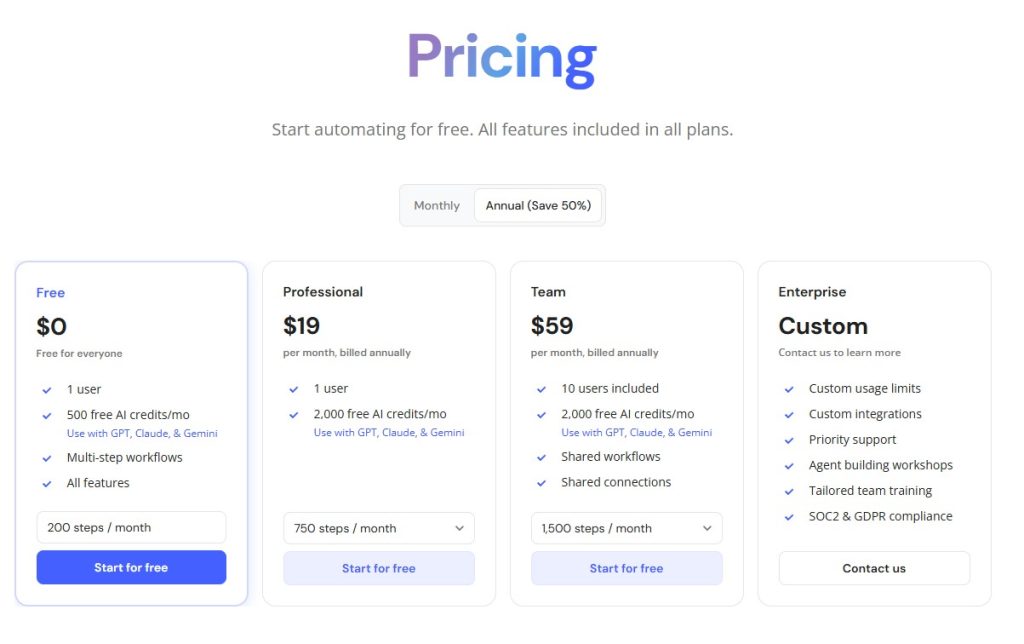
Relay offers approachable pricing for individuals and teams.

For a full breakdown, see our Relay.app Pricing guide.


Zapier Pricing

Zapier offers a free plan and multiple paid tiers.

Pricing can increase quickly with higher automation volume.

For cost-sensitive users, Relay may feel more affordable.


Best Use Cases

Choose Relay.app if:

  • You want modern AI automation
  • You work in a team
  • You need approval workflows
  • You prefer cleaner UI

Choose Zapier if:

  • You need maximum integrations
  • You automate across many apps
  • You need mature reliability

Final Verdict: Relay.app or Zapier?

Choose Relay.app if you want a more modern, AI-first automation platform with built-in collaboration.

Choose Zapier if you need the largest ecosystem and proven reliability.

If you also want to compare another popular alternative, read Relay.app vs Make

For many teams, Relay.app feels like the future of workflow automation.

Relay.app Review (2026): Is This AI Automation Tool Worth It?

relay app review

Automation tools are becoming essential for businesses that want to save time and reduce repetitive work.

One of the newest tools gaining attention is Relay.app.

But how does it compare to established automation platforms like Zapier and Make.com?

In this Relay.app review, we’ll cover its features, pricing, pros and cons, and whether it’s worth trying.

If you’re comparing automation platforms, you may also want to read our Relay.app vs Zapier


What Is Relay.app?

Relay.app is an AI-powered workflow automation tool designed to help users automate tasks between apps.

Think of it as a simpler and more collaborative alternative to traditional automation tools.

You can automate things like:

  • Lead notifications
  • CRM updates
  • Email workflows
  • AI content pipelines
  • Slack alerts
  • Form processing
  • Task management

Its biggest selling point is combining automation + human approval steps, which many tools don’t handle well.


Key Relay.app Features

1. Visual Workflow Builder

Relay offers an easy drag-and-drop interface.

You can build automations without coding.

That makes it beginner-friendly compared to more technical tools.


2. Human-in-the-Loop Automation

This is Relay’s standout feature.

You can pause workflows and request human approval before the next step runs.

Examples:

  • Approve AI-generated emails
  • Review lead assignments
  • Confirm task updates

This gives more control than fully automated workflows.


3. AI-Powered Actions

Relay supports AI steps inside workflows, allowing you to:

  • Summarize text
  • Generate replies
  • Extract information
  • Draft content automatically

This makes it more modern than traditional automation tools.


4. App Integrations

Relay connects with popular tools like:

  • Slack
  • Gmail
  • Google Sheets
  • Notion
  • HubSpot
  • Airtable

The integration library is growing quickly.


Relay.app Pricing

relay pricing

Relay offers pricing suitable for individuals and teams. For a full breakdown of plans and value, check our detailed Relay.app Pricing guide

Compared to larger competitors, pricing feels approachable.


Relay.app Pros and Cons

Pros

✅ Easy to use
✅ Beautiful interface
✅ Human approval steps
✅ AI-powered automation
✅ Great for teams


Cons

❌ Fewer integrations than Zapier
❌ Newer platform
❌ Advanced workflows may still favor Make.com


Relay.app vs Zapier

Compared to Zapier:

Relay.app

  • Easier UI
  • Better collaboration
  • Human approval features
  • AI-native feel

Zapier

  • More integrations
  • More mature platform
  • Larger ecosystem

If you want simplicity, Relay may win.

You can read our full Relay.app vs Zapier comparison for a detailed side-by-side breakdown.


Relay.app vs Make.com

Compared to Make:

Relay.app

  • Easier learning curve
  • Better for teams

Make.com

  • More powerful workflows
  • Better for advanced users

We also compared Relay.app vs Make to help you choose the right automation platform.


Who Should Use Relay.app?

Relay.app is ideal for:

  • Small businesses
  • Agencies
  • Marketing teams
  • Operations teams
  • Real estate lead automation
  • AI workflow builders

If you want modern automation without complexity, Relay is worth trying.


Final Verdict: Is Relay.app Worth It?

Relay.app is one of the most promising new automation tools available.

Its combination of:

  • Easy automation
  • AI actions
  • Human approval steps

makes it especially attractive for teams.

If Zapier feels too basic and Make.com feels too complicated, Relay.app may be the perfect middle ground.

Still exploring your options? Check our full list of the Best AI Automation Tools

Best AI Writing Tools (2026): 7 Top AI Writers Compared

3
Best AI Writing Tools

AI writing tools have become essential for bloggers, marketers, freelancers, and businesses.

Whether you need help writing blog posts, marketing copy, emails, or social media captions, the right AI writer can save hours every week.

In this guide, we compare the best AI writing tools available in 2026, including pricing, strengths, and who each tool is best for.


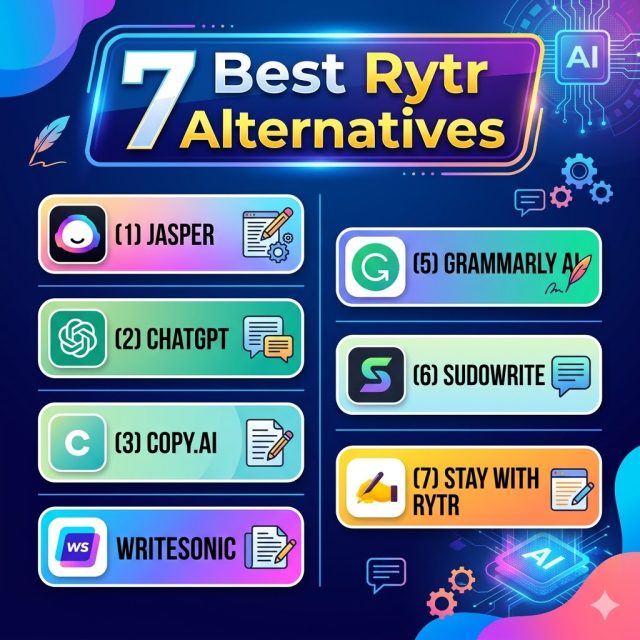
Quick Comparison Table

ToolBest ForStarting Price
RytrBudget usersAffordable
JasperBusinesses & teamsPremium
ChatGPTFlexible writingFree/Paid
Copy.aiMarketing copyMid-range
WritesonicSEO contentMid-range
Grammarly AIEditing & rewritingFree/Paid
SudowriteCreative writingPremium

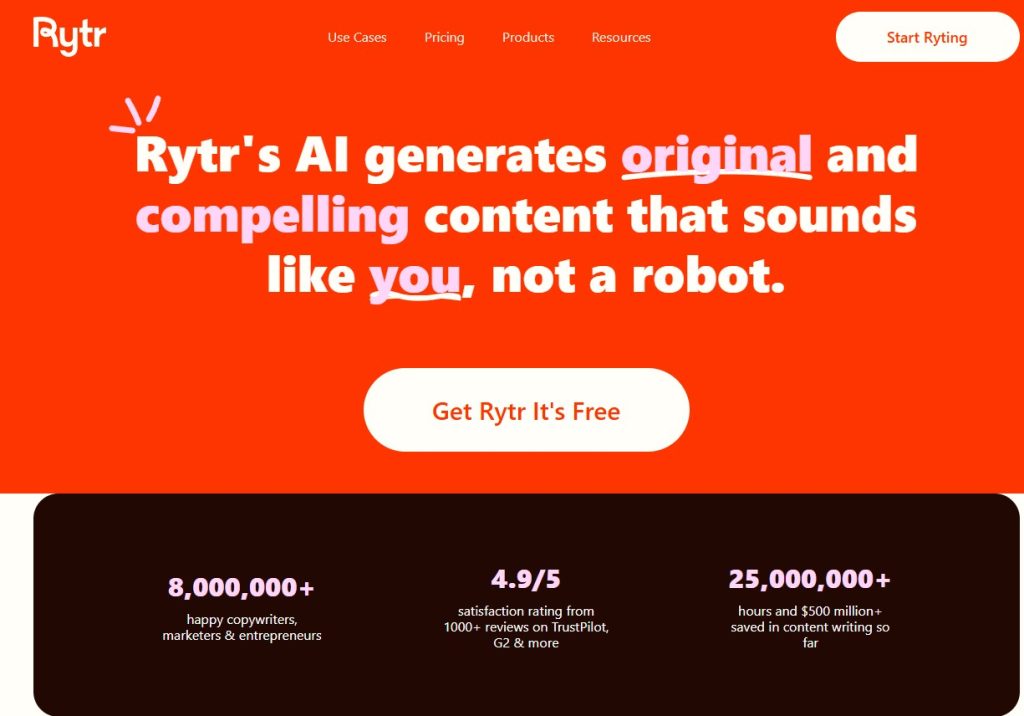
1. Rytr – Best Budget AI Writing Tool

Rytr is one of the best affordable AI writing tools for beginners.

Best for:

  • Bloggers
  • Freelancers
  • Affiliate marketers
  • Small businesses

Pros

✅ Affordable pricing
✅ Easy to use
✅ Multiple templates
✅ Great for short-form content

Cons

❌ Long-form writing needs editing

If you’re just starting, Rytr offers some of the best value for money among AI writers. Read our full Rytr Review to see how it performs in real-world use, or check the latest Rytr Pricing plans before signing up

Still comparing options? See our detailed Rytr vs ChatGPT comparison or explore Rytr vs Jasper to understand how Rytr stacks up against leading alternatives.


2. Jasper – Best Premium AI Writer

Jasper AI is one of the most advanced AI writing platforms.

Best for:

  • Agencies
  • Marketing teams
  • Businesses scaling content

Pros

✅ Excellent long-form writing
✅ Strong brand voice tools
✅ Advanced workflows

Cons

❌ Expensive

Jasper is powerful, but not ideal for tight budgets.


3. ChatGPT – Best Flexible AI Assistant

ChatGPT by OpenAI is incredibly versatile.

Best for:

  • Brainstorming
  • Editing
  • Research
  • Long-form drafting

Pros

✅ Very flexible
✅ Strong reasoning
✅ Multi-purpose AI

Cons

❌ No built-in writing templates

Many users combine ChatGPT with dedicated writing tools like Rytr.


4. Copy.ai – Best for Marketing Copy

Copy.ai specializes in:

  • Ad copy
  • Emails
  • Sales content
  • Website copy

It’s a strong option for marketers and startups.


5. Writesonic – Best for SEO Content

Writesonic focuses on SEO-driven writing.

Good for:

  • Blog posts
  • Landing pages
  • SEO optimization

A good alternative if SEO is your main goal.


6. Grammarly AI – Best for Editing

Grammarly is best for:

  • Grammar correction
  • Rewriting
  • Tone improvement

It’s more of an AI editor than a full writing generator.


7. Sudowrite – Best for Creative Writing

Sudowrite is built for:

  • Fiction writers
  • Storytelling
  • Creative brainstorming

A niche but excellent AI tool.


Which AI Writing Tool Should You Choose?

Choose Rytr if:

  • You want affordable pricing
  • You need simple writing templates
  • You’re a beginner

Choose Jasper if:

  • You need premium features
  • You run a business or agency

Choose ChatGPT if:

  • You want flexibility
  • You need brainstorming and editing help

Choose Writesonic if:

  • SEO content is your priority

Final Verdict

The best AI writing tool depends on your goals.

For most users, Rytr is the best starting point thanks to its affordability and simplicity.

If you want to start with an easy, budget-friendly AI writer:

Rytr vs Jasper (2026): Which AI Writing Tool Should You Choose?

Rytr vs Jasper

Choosing between Rytr and Jasper AI can be difficult.

Both are popular AI writing tools, but they target different users.

Rytr is known for affordability and simplicity.
Jasper is known for premium features and advanced content generation.

In this comparison, we’ll break down Rytr vs Jasper to help you decide which one fits your needs.


Quick Verdict

Choose Rytr if you want:

✅ Lower pricing
✅ Simple writing templates
✅ Beginner-friendly interface
✅ Fast short-form content

Choose Jasper if you want:

✅ Better long-form writing
✅ More advanced AI features
✅ Team collaboration tools
✅ Stronger brand/business workflows

For most solo users, Rytr offers better value.
For teams and professionals, Jasper may be worth the higher price.


Rytr vs Jasper: Feature Comparison

FeatureRytrJasper
Price✅ More affordableMore expensive
Ease of use✅ EasierModerate
Writing qualityGood✅ Better
Long-form writingLimited✅ Strong
TemplatesGoodExcellent
Team featuresBasic✅ Better
Beginner friendly✅ YesYes

1. Pricing

Rytr Pricing

Rytr is one of the cheapest AI writing tools available.

It offers:

  • Free plan
  • Unlimited plan
  • Premium plan

Jasper Pricing

Jasper is significantly more expensive.

Its pricing reflects:

  • Advanced AI models
  • Better team collaboration
  • Business-focused features

For budget-conscious users, Jasper can feel expensive.

Winner: Rytr


2. Ease of Use

Rytr

Rytr is extremely easy:

  1. Pick a template
  2. Enter your prompt
  3. Generate content

Great for beginners.


Jasper

Jasper offers more tools and flexibility, but the interface can feel more complex.

It may take time to learn fully.

Winner: Rytr


3. Writing Quality

Rytr

Rytr works well for:

  • Product descriptions
  • Ad copy
  • Social posts
  • Email drafts
  • Blog outlines

Long-form content often needs editing.


Jasper

Jasper generally delivers:

  • Better coherence
  • Better long-form output
  • Better brand voice consistency
  • More polished drafts

Winner: Jasper


4. Templates and Tools

Both platforms offer writing templates.

Rytr covers essential needs.

Jasper includes more advanced marketing workflows and business-focused templates.

Winner: Jasper


5. Best Use Cases

Choose Rytr if you are:

  • A beginner
  • An affiliate marketer
  • A blogger
  • A freelancer
  • On a budget

Choose Jasper if you are:

  • A content agency
  • A marketing team
  • A business scaling content production
  • Managing multiple brand voices

Final Verdict: Is Rytr Better Than Jasper?

For most individual users, Rytr is the smarter choice.

It’s affordable, easy to use, and handles everyday writing tasks well.

If you need premium long-form writing and advanced business tools, Jasper may be worth the extra cost.

Rytr and Jasper are both strong choices, but you can compare more platforms in our complete Best AI Writing Tools roundup.

Rytr vs ChatGPT (2026): Which AI Writing Tool Is Better?

Rytr vs ChatGPT

If you’re looking for an AI writing assistant, you’ve probably narrowed it down to two popular options: Rytr and ChatGPT by OpenAI.

Both can help you write faster—but they work differently and serve different users.

In this comparison, we’ll break down Rytr vs ChatGPT across pricing, features, ease of use, and writing quality.


Quick Verdict

Choose Rytr if you want:

✅ Ready-made writing templates
✅ Faster content generation
✅ Beginner-friendly interface
✅ Affordable pricing

Choose ChatGPT if you want:

✅ More flexible AI conversations
✅ Better reasoning and creativity
✅ Advanced custom prompts
✅ Multi-purpose AI assistant

For most beginners focused on content writing, Rytr is easier.
For advanced users, ChatGPT offers more power.


Rytr vs ChatGPT: Feature Comparison

Rytr vs ChatGPT
FeatureRytrChatGPT
Writing templates✅ Yes❌ No built-in templates
AI chatLimited✅ Excellent
Blog writingGoodVery good
SEO writingGoodBetter with prompting
Ease of use✅ EasierModerate
PriceLowerDepends on plan
Custom workflowsLimitedBetter

1. Ease of Use

Rytr

Rytr is designed specifically for writing.

You simply:

  1. Choose a use case
  2. Add your topic
  3. Click generate

It’s extremely beginner-friendly.

ChatGPT

ChatGPT requires prompting.

You need to tell it:

  • What to write
  • Desired tone
  • Word count
  • Format

That gives more flexibility—but also more effort.

Winner: Rytr


2. Writing Quality

Rytr

Rytr performs well for:

  • Product descriptions
  • Email drafts
  • Social media posts
  • Blog outlines
  • Ad copy

However, long-form articles often need editing.

ChatGPT

ChatGPT usually produces:

  • More natural flow
  • Better reasoning
  • Better long-form content
  • Better nuanced explanations

Winner: ChatGPT


3. Templates & Workflow

Rytr shines here.

It includes 40+ built-in templates like:

  • Blog ideas
  • Meta descriptions
  • AIDA copy
  • PAS framework
  • Email writing
  • Website copy

ChatGPT has no templates—you build your own prompts.

Winner: Rytr


4. Pricing

Rytr Pricing

Rytr Pricing

Rytr is one of the most affordable AI writing tools.

It offers:

  • Free plan
  • Unlimited plan
  • Premium plan

ChatGPT Pricing

ChatGPT offers:

  • Free version
  • Paid premium plan

ChatGPT may offer more power, but Rytr is often cheaper for dedicated writing.

Winner: Rytr


5. Best Use Cases

Rytr is best for:

  • Beginners
  • Bloggers
  • Affiliate marketers
  • Small businesses
  • Fast copy generation

ChatGPT is best for:

  • Researchers
  • Advanced writers
  • Prompt engineers
  • Brainstorming complex ideas
  • Multi-purpose AI use

Final Verdict: Rytr or ChatGPT?

Want to compare even more options? Explore our full list of the Best AI Writing Tools to find the right AI writer for your workflow.

Choose Rytr if:

  • You want the easiest AI writing tool
  • You need templates
  • You want affordable pricing

Choose ChatGPT if:

  • You want maximum flexibility
  • You write long-form content
  • You’re comfortable using prompts

For many users, the best setup is actually:

Rytr for fast structured writing + ChatGPT for editing and brainstorming.

Try Rytr here:

Rytr Pricing 2026: Free Plan Limits, Paid Plans & Hidden Costs

3
Rytr paid plan pricing and features

If you’re considering using Rytr, one of the first questions you’ll ask is:

How much does Rytr cost—and which plan should you choose?

In this guide, we’ll break down Rytr pricing, compare all available plans, and help you decide whether Rytr is worth paying for. Compared to other tools in our Best AI Writing Tools guide, Rytr remains one of the most budget-friendly options.

Rytr Pricing Overview

Rytr Pricing

Rytr offers 3 pricing plans:

PlanBest ForPrice
FreeBeginners testing AI writingFree
UnlimitedMost usersAffordable monthly fee
PremiumTeams & businessesHigher-tier pricing

Rytr is widely known as one of the most affordable AI writing tools available today.


1. Rytr Free Plan

The Free Plan is perfect if you want to test the platform before upgrading.

What’s included:

  • Limited AI-generated characters per month
  • Access to 40+ use cases
  • Multiple writing tones
  • Built-in editor
  • Browser extension access

Pros

✅ Completely free
✅ Good for occasional use
✅ Great for beginners

Limitations

❌ Character limits
❌ Not ideal for heavy content creators

If you only need occasional AI help, this may be enough.

Want to use Rytr for free? Read our guide to Rytr Free Plan Limits.


2. Rytr Unlimited Plan

The Unlimited Plan is the most popular option.

It removes monthly writing limits and gives full access to Rytr’s core features.

Best for:

  • Bloggers
  • Affiliate marketers
  • Freelancers
  • Business owners

Benefits:

✅ Unlimited AI writing
✅ Faster workflow
✅ Better value than premium competitors

For most Toolnora readers, this is the recommended plan.


3. Rytr Premium Plan

Rytr’s highest plan is designed for advanced users and teams.

Best for:

  • Agencies
  • Marketing teams
  • Businesses managing multiple projects

Extra benefits:

  • Team collaboration
  • Advanced support
  • Expanded usage options

Most solo users won’t need this.


Rytr Free vs Paid: Which Should You Choose?

Choose Free Plan if:

  • You want to test Rytr first
  • You only write occasionally
  • You have a small budget

Choose Unlimited Plan if:

  • You create content weekly
  • You run an affiliate website
  • You write blogs, emails, or ads regularly

Choose Premium Plan if:

  • You have a team
  • You need collaboration features

Is Rytr Worth Paying For?

For many users, yes.

Compared to expensive alternatives like Jasper, Rytr offers:

  • Lower cost
  • Easier interface
  • Strong AI output for short-form content

It’s especially good for:

  • Blog outlines
  • Product descriptions
  • Ad copy
  • Email drafts
  • Social media content

If affordability matters, Rytr is hard to beat.


Rytr Pricing vs Competitors

Rytr vs Jasper

Rytr is much cheaper. Jasper is more advanced but costs significantly more.

Rytr vs ChatGPT

ChatGPT offers flexibility, but Rytr provides built-in writing templates and easier workflow.

For beginners, Rytr often feels simpler.


Final Verdict: Which Rytr Plan Is Best?

For most people, the Unlimited Plan offers the best value.

It gives unlimited writing at a reasonable price and unlocks Rytr’s full potential.

If you’re unsure, start with the Free Plan, then upgrade when needed.

Looking for a quick breakdown? See our guide to Rytr Cost.

Rytr Review (2026): Is This AI Writing Tool Worth It?

Rytr Review

If you’re still comparing multiple platforms, check our full guide to the Best AI Writing Tools to see how Rytr stacks up against other top AI writers., Rytr is one of the most popular options on the market.

But is it actually good enough for bloggers, marketers, and businesses—or is it just another overhyped AI tool?

In this Rytr review, we’ll cover its key features, pricing, pros and cons, and compare it to alternatives like ChatGPT and Jasper.

Want to use Rytr for free? Check our guide to Rytr Free Plan Limits.

What Is Rytr?

Rytr is an AI writing assistant designed to help users create content faster.

It can generate:

  • Blog posts
  • Marketing copy
  • Emails
  • Product descriptions
  • Social media captions
  • Website copy
  • Business proposals

Rytr uses advanced language models to generate human-like text in seconds, making it a popular choice for freelancers, startups, and small businesses.


Rytr Features

Rytr review

1. 40+ Content Use Cases

Rytr offers multiple writing templates, including:

  • Blog ideas
  • Blog outlines
  • SEO meta descriptions
  • Facebook ads
  • Google ads
  • Landing page copy
  • Email writing
  • AIDA & PAS frameworks

This makes it useful for both content creators and marketers.


2. Multiple Tone Options

You can choose from over 20 tones such as:

  • Professional
  • Friendly
  • Persuasive
  • Convincing
  • Casual
  • Humorous

This helps customize the writing style based on your audience.


3. Built-In AI Editor

Rytr includes a simple editor where you can:

  • Rewrite text
  • Expand paragraphs
  • Shorten content
  • Improve grammar
  • Change tone

It works like an AI-powered writing workspace.


4. Affordable Pricing

Compared to competitors like Jasper, Rytr is significantly cheaper.

That’s one of its biggest advantages.


Rytr Pricing

Rytr Pricing

Rytr currently offers:

Free Plan

Good for testing the platform.

Includes:

  • Limited monthly characters
  • Access to templates
  • Basic AI generation

Unlimited Plan

Best for regular users.

Includes:

  • Unlimited AI writing
  • Full feature access
  • Priority support

Premium Plan

Designed for teams and businesses.

For most users, the Unlimited Plan is enough.


Rytr Pros and Cons

Pros

✅ Affordable pricing
✅ Easy to use
✅ Good for short-form content
✅ Multiple writing templates
✅ Free plan available
✅ Beginner-friendly

Cons

❌ Long-form blog posts need editing
❌ Sometimes repetitive output
❌ Less powerful than premium tools like Jasper


Rytr vs ChatGPT

Many users compare Rytr vs ChatGPT.

Rytr is better if you want:

  • Ready-made writing templates
  • Simpler workflow
  • Faster content generation

ChatGPT is better if you want:

  • More flexibility
  • Better reasoning
  • Custom prompts

For beginners, Rytr can be easier.

For advanced users, ChatGPT may offer more control.

Read our full Rytr vs ChatGPT comparison.


Rytr vs Jasper

Compared to Jasper:

Rytr

  • Cheaper
  • Simpler
  • Better for individuals

Jasper

  • More advanced
  • Better long-form writing
  • Better for agencies and teams

If budget matters, Rytr wins.


Who Should Use Rytr?

Rytr is ideal for:

  • Bloggers
  • Freelancers
  • Affiliate marketers
  • Small business owners
  • Real estate agents writing listings
  • Social media managers

If you need affordable AI writing help, Rytr is a strong option.


Final Verdict: Is Rytr Worth It?

Rytr offers excellent value for money.

While it may not be the most advanced AI writer available, it’s one of the best affordable AI writing tools for beginners and small businesses.

For under the cost of most premium AI tools, you get a fast and reliable writing assistant that can save hours every week.

Ready to try Rytr?

Looking for other options? Explore these Rytr Alternatives

Murf AI Review 2026: Is This AI Voice Generator Worth It?

1

AI voice generators are becoming essential for creators, marketers, and businesses—but not all of them sound natural. In this Murf AI review, we test one of the most popular AI voice generators in 2026 to see if it’s really worth paying for.

Murf AI promises realistic voices, easy voice customization, and professional-quality voiceovers without needing expensive recording equipment. But can it compete with top alternatives like ElevenLabs and PlayHT?

In this review, we’ll cover Murf AI pricing, key features, pros and cons, and who should use it.


What Is Murf AI?

Murf AI is an AI-powered text-to-speech and voiceover platform designed to turn written text into realistic spoken audio.

It’s commonly used for:

  • YouTube voiceovers
  • Online courses
  • Podcasts
  • Product demos
  • Marketing videos
  • Business presentations
  • Audiobook narration

Unlike basic text-to-speech tools, Murf focuses on premium-quality human-like voices.


Murf AI dashboard overview

Murf AI Key Features

1. Realistic AI Voices

Murf AI offers over 120+ AI voices across multiple languages and accents.

Supported languages include:

  • English (US, UK, Australia)
  • Spanish
  • French
  • German
  • Hindi
  • Japanese

The voice quality is highly natural, making Murf ideal for professional content.


Murf AI voice library

2. Advanced Voice Customization

One of Murf AI’s biggest strengths is voice editing flexibility.

Users can adjust:

  • Speed
  • Pitch
  • Pronunciation
  • Pauses
  • Emphasis
  • Tone

This makes voiceovers sound more human and less robotic.


3. Built-In Voiceover Studio

Murf includes an easy-to-use editor that lets you:

  • Add text blocks
  • Preview voices instantly
  • Sync voice with slides
  • Add background music
  • Export finished audio

This makes Murf more than just a text-to-speech tool.


Murf AI Pricing (2026)

Murf AI offers both free and paid plans.

Free Plan

Ideal for testing features before upgrading.

Creator Plan

Best for solo creators and freelancers needing regular voiceovers.

Business Plan

Designed for teams and companies.

You can check current pricing on the official Murf AI website.


Murf AI pricing plans

Murf AI Pros and Cons

Pros

✅ Realistic AI voices
✅ Easy-to-use interface
✅ Multiple languages
✅ Strong editing controls
✅ Great for YouTube and marketing

Cons

❌ Limited free plan
❌ Premium plans can be expensive
❌ Some voices sound similar


Murf AI vs Competitors

Compared to ElevenLabs and PlayHT, Murf AI is better for users who want a complete voiceover studio.

If you need advanced voice cloning, ElevenLabs may be better.

If you want easy editing and commercial-ready voiceovers, Murf AI is an excellent choice.


Is Murf AI Worth It?

Yes—especially for creators, educators, and businesses that need professional AI voiceovers quickly.

Murf AI combines:

  • High-quality voices
  • Easy editing tools
  • Professional workflow

It may not be the cheapest option, but it offers strong value.


Final Verdict

Murf AI remains one of the best AI voice generators in 2026.

If you want realistic voiceovers without recording your own voice, it’s definitely worth trying.

Also read our HeyGen Review

Popular Posts

My Favorites

Workflow Automation Platform (2026): Best Solutions for Businesses

0
Workflow automation platforms help businesses automate repetitive tasks, streamline operations, and improve productivity.Whether you're managing sales pipelines, customer support workflows, marketing campaigns, or internal...