



Automation

Home AI Tools Automation Page 4
Best AI automation tools to streamline workflows, reduce repetitive tasks, and improve efficiency.

Relay.app vs Zapier (2026): Which Automation Tool Is Better?

Relay.app vs Zapier

If you’re choosing an automation platform, two tools worth comparing are Relay.app and Zapier.

If you’re new to Relay, read our full Relay.app Review before comparing it with competitors.

Zapier is one of the most established automation tools on the market.

Relay.app is a newer AI-first platform built for modern collaborative workflows.

So which one should you choose?

In this comparison, we’ll break down Relay.app vs Zapier across features, pricing, ease of use, and best use cases.


Quick Verdict

Choose Relay.app if you want:

✅ Simpler workflow builder
✅ AI-powered automation
✅ Human approval steps
✅ Better team collaboration

Choose Zapier if you want:

✅ Thousands of app integrations
✅ Mature ecosystem
✅ Reliable automations
✅ Advanced app compatibility

For modern AI workflows, Relay.app is exciting.
For broad app support, Zapier still wins.

If you’re still evaluating multiple platforms, check our roundup of the Best AI Automation Tools


Feature Comparison

FeatureRelay.appZapier
Ease of use✅ EasierGood
AI features✅ StrongerBasic
Human approvals✅ YesLimited
IntegrationsGrowing✅ Massive
Team collaboration✅ BetterGood
Workflow complexityModerateModerate

1. Ease of Use

Relay.app

Relay has one of the cleanest automation interfaces available.

Its drag-and-drop builder feels modern and easy to understand.

Beginners can create workflows quickly.


Zapier

Zapier is also beginner-friendly, but some workflows can become complicated as automations scale.

Its interface feels more traditional.

Winner: Relay.app


2. App Integrations

Relay.app

Relay supports many popular apps:

  • Gmail
  • Slack
  • Notion
  • Airtable
  • HubSpot
  • Google Sheets

But its library is still growing.


Zapier

Zapier supports thousands of integrations.

It connects with almost everything.

For compatibility, Zapier remains unmatched.

Winner: Zapier


3. AI Features

Relay.app is built with AI in mind.

You can automate tasks like:

  • Summarizing text
  • Generating responses
  • Extracting information
  • AI-assisted workflow steps

Zapier has AI features too, but they feel less central.

Winner: Relay.app


4. Human-in-the-Loop Automation

This is where Relay stands out.

You can pause workflows and request manual approval before continuing.

Examples:

  • Review AI-generated emails
  • Approve CRM updates
  • Validate lead assignments

Zapier can do some of this, but not as elegantly.

Winner: Relay.app


5. Pricing

Relay.app Pricing
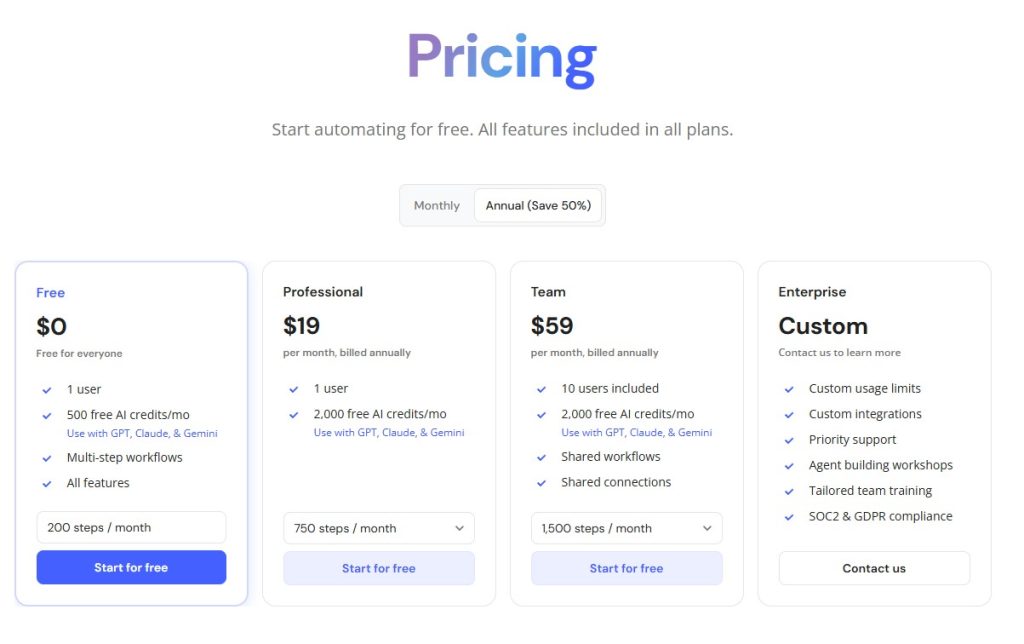
relay pricing

Relay offers approachable pricing for individuals and teams.

For a full breakdown, see our Relay.app Pricing guide.


Zapier Pricing

Zapier offers a free plan and multiple paid tiers.

Pricing can increase quickly with higher automation volume.

For cost-sensitive users, Relay may feel more affordable.


Best Use Cases

Choose Relay.app if:

  • You want modern AI automation
  • You work in a team
  • You need approval workflows
  • You prefer cleaner UI

Choose Zapier if:

  • You need maximum integrations
  • You automate across many apps
  • You need mature reliability

Final Verdict: Relay.app or Zapier?

Choose Relay.app if you want a more modern, AI-first automation platform with built-in collaboration.

Choose Zapier if you need the largest ecosystem and proven reliability.

If you also want to compare another popular alternative, read Relay.app vs Make

For many teams, Relay.app feels like the future of workflow automation.

Relay.app Review (2026): Is This AI Automation Tool Worth It?

Relay.app Review

Automation tools are becoming essential for businesses that want to save time and reduce repetitive work.

One of the newest tools gaining attention is Relay.app.

But how does it compare to established automation platforms like Zapier and Make.com?

In this Relay.app review, we’ll cover its features, pricing, pros and cons, and whether it’s worth trying.

If you’re comparing automation platforms, you may also want to read our Relay.app vs Zapier


What Is Relay.app?

Relay.app is an AI-powered workflow automation tool designed to help users automate tasks between apps.

Think of it as a simpler and more collaborative alternative to traditional automation tools.

You can automate things like:

  • Lead notifications
  • CRM updates
  • Email workflows
  • AI content pipelines
  • Slack alerts
  • Form processing
  • Task management

Its biggest selling point is combining automation + human approval steps, which many tools don’t handle well.


Key Relay.app Features

1. Visual Workflow Builder

Relay offers an easy drag-and-drop interface.

You can build automations without coding.

That makes it beginner-friendly compared to more technical tools.


2. Human-in-the-Loop Automation

This is Relay’s standout feature.

You can pause workflows and request human approval before the next step runs.

Examples:

  • Approve AI-generated emails
  • Review lead assignments
  • Confirm task updates

This gives more control than fully automated workflows.


3. AI-Powered Actions

Relay supports AI steps inside workflows, allowing you to:

  • Summarize text
  • Generate replies
  • Extract information
  • Draft content automatically

This makes it more modern than traditional automation tools.


4. App Integrations

Relay connects with popular tools like:

  • Slack
  • Gmail
  • Google Sheets
  • Notion
  • HubSpot
  • Airtable

The integration library is growing quickly.


Relay.app Pricing

relay pricing

Relay offers pricing suitable for individuals and teams. For a full breakdown of plans and value, check our detailed Relay.app Pricing guide

Compared to larger competitors, pricing feels approachable.


Relay.app Pros and Cons

Pros

✅ Easy to use
✅ Beautiful interface
✅ Human approval steps
✅ AI-powered automation
✅ Great for teams


Cons

❌ Fewer integrations than Zapier
❌ Newer platform
❌ Advanced workflows may still favor Make.com


Relay.app vs Zapier

Compared to Zapier:

Relay.app

  • Easier UI
  • Better collaboration
  • Human approval features
  • AI-native feel

Zapier

  • More integrations
  • More mature platform
  • Larger ecosystem

If you want simplicity, Relay may win.

You can read our full Relay.app vs Zapier comparison for a detailed side-by-side breakdown.


Relay.app vs Make.com

Compared to Make:

Relay.app

  • Easier learning curve
  • Better for teams

Make.com

  • More powerful workflows
  • Better for advanced users

We also compared Relay.app vs Make to help you choose the right automation platform.


Who Should Use Relay.app?

Relay.app is ideal for:

  • Small businesses
  • Agencies
  • Marketing teams
  • Operations teams
  • Real estate lead automation
  • AI workflow builders

If you want modern automation without complexity, Relay is worth trying.


Final Verdict: Is Relay.app Worth It?

Relay.app is one of the most promising new automation tools available.

Its combination of:

  • Easy automation
  • AI actions
  • Human approval steps

makes it especially attractive for teams.

If Zapier feels too basic and Make.com feels too complicated, Relay.app may be the perfect middle ground.

Still exploring your options? Check our full list of the Best AI Automation Tools

Popular Posts

My Favorites

Workflow Automation Software Comparison

Workflow Automation Software Comparison (2026): Which Tool Is Best?

1
Workflow automation software helps businesses eliminate repetitive tasks, improve efficiency, and scale operations faster.Whether you're automating marketing campaigns, customer support, HR processes, or sales...